• Home
  • About me
  • Curriculum
  • Projects
Facebook Linkedin Twitter

MauroCerbai

Software Engineer

Come ho costruito un database SQLite parsificando i dati dei pokemon disponibili sulle guide online


Partendo dall'esperienza del precedente articolo ( che vi riporto ) possiamo decidere di concentrarci su alcune pagine specifiche che contengono i dati che ci interessano.
In particolare voglio :
  • la lista completa dei pokemon di prima generazione
  • la lista delle mn e di quali pokemon possono impararle
1. lista pokemon
Per estrarre la lista dei pokemon e crearne un json potete fare riferimento al precedente post.
Ne otterremo un json che potete trovare a questo indirizzo : github.com/pokedex_list.json

2. mn e quali pokemon possono impararle
In modo del tutto simile al primo ho estratto i dati dalle pagine html della wiki di pokemoncentral. Per fare un esempio dalla pagina relativa al MN Taglio ( https://wiki.pokemoncentral.it/Taglio ) potete estrarre le informazioni necessarie con il seguente script:


function getPkList(tbl, array){
    $(tbl).find('tr').each(function (i) { //loop on each tr in table
        // SKIP HEADER
        if(i===0) return;
        //CREATE POKEMON OBJECT
        var poke = {};
        var $tds = $(this).find('td'); //get all td tags
        poke.strid = $tds.eq(1).text(); //access first td and get text content
        poke.strid = poke.strid.replace('#','');
        poke.id = parseInt(poke.strid, 10);
        poke.imageUrl = $tds.eq(2).find('img')[0].getAttribute('src'); //access second td and get src attribute of the img tag
        poke.name = $tds.eq(3).find('a')[0].text;
        poke.type1 = $tds.eq(4)[0].innerText;
        if($tds.eq(5)[0])
            poke.type2 = $tds.eq(5)[0].innerText;
        array.push(poke); //save object to the array
    });
}


 Il codice completo lo potete trovare a questo indirizzo: https://github.com/mcmaur/MyPokedex/blob/master/data/parser/parse_mn_list.js

Probabilmente dovrete adattarlo un poco a secondo della struttura delle altre pagine delle MN.

Una volta che lo avete eseguito su ogni MN vi troverete questo json:
https://github.com/mcmaur/MyPokedex/blob/master/data/MN_list.json


Struttura del database

Cosa facciamo di questi due json? Bhè a sto punto studiamo una configurazione del database più adatta ai nostri dati e li importiamo.

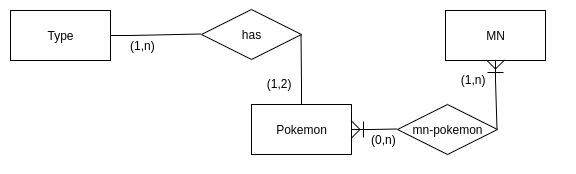
Risulta piuttosto evidente che il cuore è il POKEMON. Ogni pokemon ha 1 o 2 TIPI.
Ci sono 5 MN e per ognuna c'è una lista di pokemon compatibili. Per questo motivo il database avrà questa struttura:


Import dei dati in database

Nell'ambito della sperimentazione ho voluto provare Node.js .
Il codice contenuto nell'app.js fai i seguenti passaggi:
  • crea le tabelle del database
db.prepare(`CREATE TABLE IF NOT EXISTS \`types\` (
  \`id\` INT NOT NULL, \`name\` VARCHAR(100) NOT NULL,
   PRIMARY KEY (\`id\`));`).run();
  • leggo il json e ciclo su ogni valore
let pokelist = JSON.parse(fs.readFileSync('./data/pokedex_list.json', 'utf8'));
for (let index in pokelist) {

  • verifico se il tipo è già presente altrimenti l'aggiungo
let t1 = -1, t2 = -1;
    for (let i in types) {
        if(pokelist[index].type1 === types[i]) t1 = i;
        if(pokelist[index].type2 === types[i]) t2 = i;
    }
    if(t1 === -1) t1 = (types.push(pokelist[index].type1))-1;
    if(pokelist[index].type2 !== undefined && t2 === -1) t2 = (types.push(pokelist[index].type2))-1;

  • inserisco il pokemon nel database

const stmt = db.prepare('INSERT INTO pokemon(id, imageurl, name, type1, type2) VALUES(?, ?, ?, ?, ?)');
    let info;
    if(t2 === -1)
        info = stmt.run(pokelist[index].id, pokelist[index].imageUrl, pokelist[index].name, t1, null);

  • al termine del ciclo su tutti i pokemon salvo i tipi che avevo temporaneamente tenuto in un array

for (var i in types) {
    const info = db.prepare('INSERT INTO types(id, name) VALUES(?, ?)').run(i, types[i]);

Adesso invece leggiamo i dati delle MN e importiamo anche quelli in maniera molto simile

let mnlist = JSON.parse(fs.readFileSync('./data/MN_list.json', 'utf8'));
mnlist = mnlist['MN'];

for (let key in mnlist) {
    console.log("Id " + mnlist[key].id +': '+mnlist[key].name+'| '+mnlist[key].pokes);

    const stmt = db.prepare('INSERT INTO mn(id, name) VALUES(?, ?)');
    let info = stmt.run(mnlist[key].id, mnlist[key].name);
    console.log("insert MN: "+info.changes);

    let compatible_pokemons = mnlist[key].pokes;
    for (let k in compatible_pokemons) {
        const stmt = db.prepare('INSERT INTO mn_pokemon(mn_id, pokemon_id) VALUES(?, ?)');
        let info = stmt.run(mnlist[key].id, compatible_pokemons[k]);
        console.log("insert MN-POKEMON: "+info.changes);
    }
}


FINITO: il codice completo lo potete trovare a questo indirizzo: https://github.com/mcmaur/MyPokedex/blob/master/app.js


Database scaricabile

Al termine avrete un database sqlite con tutti i dati. Il mio è disponibile a questo indirizzo: https://github.com/mcmaur/MyPokedex/blob/master/pokebase.db

Volete sapere qual'è il pokemon che può imparare più MN di tutti?
Facile! Eseguite la seguente query :

select p.id, p.name, count(m.id) as mnlearnable -- , p.name, m.name-- select *from pokemon p
join mn_pokemon mnp on p.id = mnp.pokemon_idleft join mn m on mnp.mn_id = m.idgroup by p.id
order by mnlearnable desc

ed otterrete questi risultati:


Have Fun!

Share
Tweet
Pin
Share
No commenti
We both know that programming Android is mostly rewriting a number of times the same things.
Well here we are, save this page on the bookmarks and copy/paste when you need it.

FINDVIEWBYID

 mWeatherTextView = (TextView) findViewById(R.id.tv_weather_data);  

READ JSON DATA

 JSONObject weatherdata = new JSONObject (JSONstring);  
 JSONObject weather = weatherdata.getJSONObject("weather");  
 String condition = weather.getString("condition");  

BUILD URI AND CONVERT TO URL

 Uri builturi = Uri.parse(BASE_URL).buildUpon()  
     .appendQueryParameter(QUERY_PARAM, param)  
     .build();  
 URL url = null;  
 try {  
   url = new URL(builturi.toString());  
 } catch (MalformedURLException e) {  
   e.printStackTrace();  
 }  
 return url;  

EXECUTE ASYNCTASK

 new GithubQueryTask().execute(githubSearchUrl);  


ADD MENU IN TOP BAR

 @Override  
 public boolean onCreateOptionsMenu(Menu menu) {  
   MenuInflater inflater = getMenuInflater();  
   inflater.inflate(R.menu.forecast, menu);  
   return true;  
 } 

 @Override  
 public boolean onOptionsItemSelected(MenuItem item) {  
   if (item.getItemId() == R.id.action_refresh) {  
     mWeatherTextView.setText("");  
     loadWeatherData();  
     return true;  
   }  
   return super.onOptionsItemSelected(item);  
 }  

EXPLICIT INTENT

 Intent intent = new Intent(this, SettingsActivity.class);  
 startActivity(intent);  


INTENT FOR EXTERNAL MAP

 Intent intent = new Intent(Intent.ACTION_VIEW);  
 Uri uri = new Uri.Builder().scheme("geo").path("0,0").query("california").build();  
 intent.setData(uri);  
 if (intent.resolveActivity(getPackageManager()) != null) {  
   startActivity(intent);  
 }  

SHARE INTENT

 Intent shareIntent = ShareCompat.IntentBuilder.from(activity)  
  .setType("text/plain")  
  .setText(shareText)  
  .getIntent();  
 if (shareIntent.resolveActivity(getPackageManager()) != null) {  
  startActivity(shareIntent);  
 }  

ITEM IN THE ACTION BAR

 <item  
   android:id="@+id/action_share"  
   android:title="Share"  
   android:orderInCategory="1"  
   app:showAsAction="ifRoom"/>  

ASYNCTASKLOADER

(it handles lifecycle)
 @Override  
 public Loader<String[]> onCreateLoader(int id, Bundle args) {  
   return new AsyncTaskLoader<String[]>(this) {  
     String[] weatherData = null; //Cache data  
     @Override protected void onStartLoading() {}//Check cache data and show progress bar then forceLoad()  
     @Override public String[] loadInBackground() {}//Get data from prefences or bundle and do network request  
     @Override public void deliverResult(String[] data) {}//save data in cache  
   };  
 }  

USE PREFERENCEFRAGMENT

SHAREDPREFERENCES

 SharedPreferences sharedPreferences = PreferenceManager.getDefaultSharedPreferences(this);  
 sharedPreferences.getBoolean("show_bass", true);  


LISTEN TO SWYPE ON RECYCLEVIEW

 new ItemTouchHelper(new ItemTouchHelper.SimpleCallback(0, ItemTouchHelper.LEFT | ItemTouchHelper.RIGHT) {  
   @Override  
   public boolean onMove(RecyclerView recyclerView, RecyclerView.ViewHolder viewHolder, RecyclerView.ViewHolder target) {  
     return false;  
   }  
   @Override  
   public void onSwiped(RecyclerView.ViewHolder viewHolder, int swipeDir) {  
     long id = (long) viewHolder.itemView.getTag();  
     removeGuest(id);  
     mAdapter.swapCursor(getAllGuests());  
   }  
 }).attachToRecyclerView(waitlistRecyclerView);  


Here some interesting images too:


Share
Tweet
Pin
Share
No commenti
Share
Tweet
Pin
Share
No commenti
Older Posts

About me


Smiley face
Computer Science Degree, technology enthusiast, programmer, interested in startup & innovation, curious, precise & organized.

Follow Me

  • Facebook
  • Linkedin
  • Twitter
  • Bitbucket
  • Github

recent posts

Categories

  • dev
  • development
  • software
  • learn
  • learning
  • machine
  • machine learning
  • study
  • android
  • google
  • job
  • scikit
  • sklearn
  • app
  • udacity
  • gdg
  • google play
  • html
  • code
  • electronics
  • linux
  • script
  • uda
  • webgl
  • database
  • gdgmilano
  • help
  • open source
  • programming
  • smartphone
  • torino
  • weekend
  • work
  • workshop
  • 3d
  • firebase
  • gps
  • greatmind
  • hardware
  • location
  • personal computer
  • start up
  • .bashrc
  • GB
  • PS3
  • Vallée des Merveilles
  • action
  • analytics
  • audio
  • avi
  • bayes
  • books
  • bug
  • cpu
  • dinolib
  • docker
  • fake
  • ffmpeg
  • force
  • francaise
  • france
  • francia
  • free
  • gear 360
  • gglass
  • git
  • gitconfig
  • glass
  • hdd
  • hike
  • hiring
  • jenkins
  • joke
  • kde
  • kmix
  • magnetism
  • material
  • materialdesign
  • merge-it
  • messaging
  • microservices
  • mint
  • naive bayes
  • navigation drawer
  • nemo
  • nikola
  • nikolatesla
  • pc
  • ram
  • reading
  • refuge
  • samsung
  • space
  • spain
  • ssd
  • steam
  • tesla
  • unturned
  • valle delle meraviglie
  • veromix
  • versioning
  • windows
  • wizard
  • wolley
  • wolleybuy
  • xvid

Blog Archive

  • ottobre (1)
  • settembre (1)
  • gennaio (1)
  • novembre (1)
  • maggio (1)
  • aprile (1)
  • marzo (3)
  • febbraio (3)
  • gennaio (1)
  • novembre (7)
  • ottobre (4)
  • settembre (3)
  • agosto (1)
  • luglio (1)
  • settembre (1)
  • agosto (1)
  • giugno (2)
  • aprile (2)
  • marzo (1)
  • febbraio (3)
  • gennaio (2)
  • novembre (1)
  • agosto (2)
  • luglio (2)
  • giugno (3)
  • marzo (1)
  • novembre (1)
  • ottobre (1)
  • agosto (1)
  • giugno (1)
  • maggio (2)
  • marzo (2)
  • febbraio (1)
Facebook Linkedin Twitter Bitbucket Github

Created with by ThemeXpose | Distributed By Gooyaabi Templates